AI Real Design › Fix a blurry logo
Print Shop Says Your Logo Is Too Low Resolution? Here's What to Do
By The AI Real Design Team · 15 November 2026
 ▶Watch the free 10-minute logo training
You ordered a banner, shirts or a new sign, and the print shop sent it back: "Your logo is too low resolution." Or worse, it printed fuzzy. You look for a better file and find only a small JPEG, maybe one you made yourself in Canva years ago.
This happens to a lot of small businesses. Here's why, what your options are, and how to tell which one fits your logo.
Why it looks fine on screen but blurry in print
A screen shows your logo small, so a small file looks sharp. Print is different. A 5-inch-wide logo at 300 pixels per inch needs about 1,500 pixels across. A typical web logo might be 300. Stretch it and every pixel gets five times bigger, so you see fuzzy edges and blocky JPEG noise.
That's also why changing the "DPI" number in an editor doesn't help. It changes the label, not the detail.
Your 3 options
- Find the original file. Ask whoever made the logo for the source file: AI, EPS, SVG or PDF. Check old emails and your Canva account. This is the best fix if you can find it.
- Have it redrawn as a vector. A designer traces it so it scales to any size. This is the gold standard for detailed logos, embroidery and big signs, and it costs money.
- Rebuild a clean version with AI. For logos that aren't too complex, an AI image tool can make a sharp, high-resolution version in minutes. But it needs careful checking, because AI loves to "improve" logos.
What AI gets wrong with logos
We tested this on a tiny, wrecked coffee shop logo with a typo, uneven spacing, bent letters and a spoon that looked like a spork. The first AI result looked great at a glance. Up close, it had merged the two words of the name into one and turned the soft watercolor style into flat clip art.
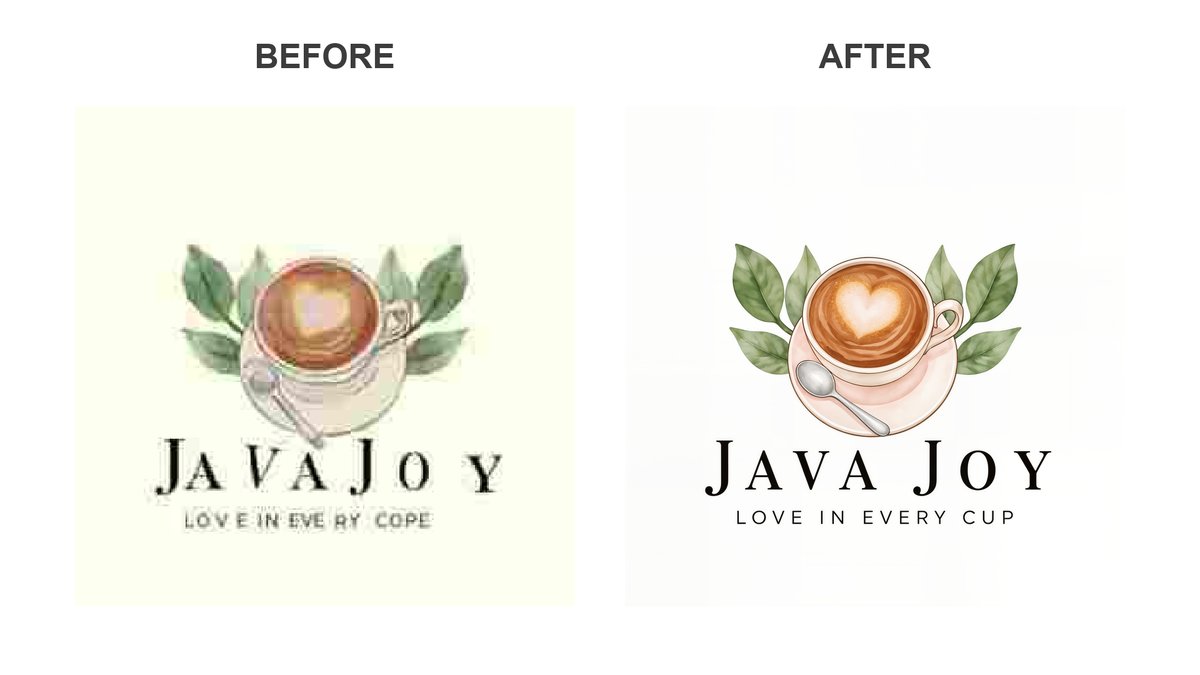
Our test logo: the fuzzy original next to the final, checked version.
That's the big lesson: your logo is your brand. The AI's job is to make it sharp, not to redesign it. So the process is less "press a button" and more "tell it exactly what to fix, then check every letter".
Get the free logo training
The process in 5 steps
- Diagnose. Zoom in to 400 percent and write down every problem. Read every word and note how it should be spelled.
- Prompt with your list. Give an AI image tool the logo and your list of fixes, and nothing else to change.
- Catch the changes. Compare closely. Merged words, new fonts and a changed style are common. Name them and run it again.
- Verify. Check every letter, shape and color at 400 percent against the original.
- Finish for print. Remove the background, set the size and resolution, and export a transparent PNG.
One free tip: check your "transparent" PNG
Put a dark color behind your logo before you send it. If the holes inside letters like O, A or P are still white, the background isn't really transparent yet, and it will show up as white boxes on a colored shirt or sign.
Quick answers
What resolution does a print shop want? Usually 300 pixels per inch at the printed size, or a vector file (AI, EPS, SVG or PDF). Ask your printer, as some jobs differ.
Can I just make my logo bigger in Canva? It will get bigger, but not sharper. The blur gets bigger too.
When do I really need a vector? For embroidery, vinyl cutting, very large signs and very detailed logos. A clean high-resolution PNG is fine for many shirts, flyers and banners. Ask your printer.
Rescue your logo, free
Our free 10-minute training walks you through the whole rescue on a real wrecked logo, with the prompts to copy, the checks, and the print-ready finish. It's taught by Ryan, our AI trainer. Ryan is an AI character, not a real person.
▶Watch the free 10-minute logo training
Free. Just your first name and email. No card.